

 Chatpane for Jira Cloud
Jira updates, right where your team talks.
Chatpane sends Jira updates to Google Chat spaces, and soon each person's own assignments and mentions as direct messages. Pick what each space hears about, keep every work item in its own thread, and set it up in a minute.
Free for teams of up to 10 users. Sends Jira updates only to the Google Chat spaces you connect and the people who connect their own Google Chat.
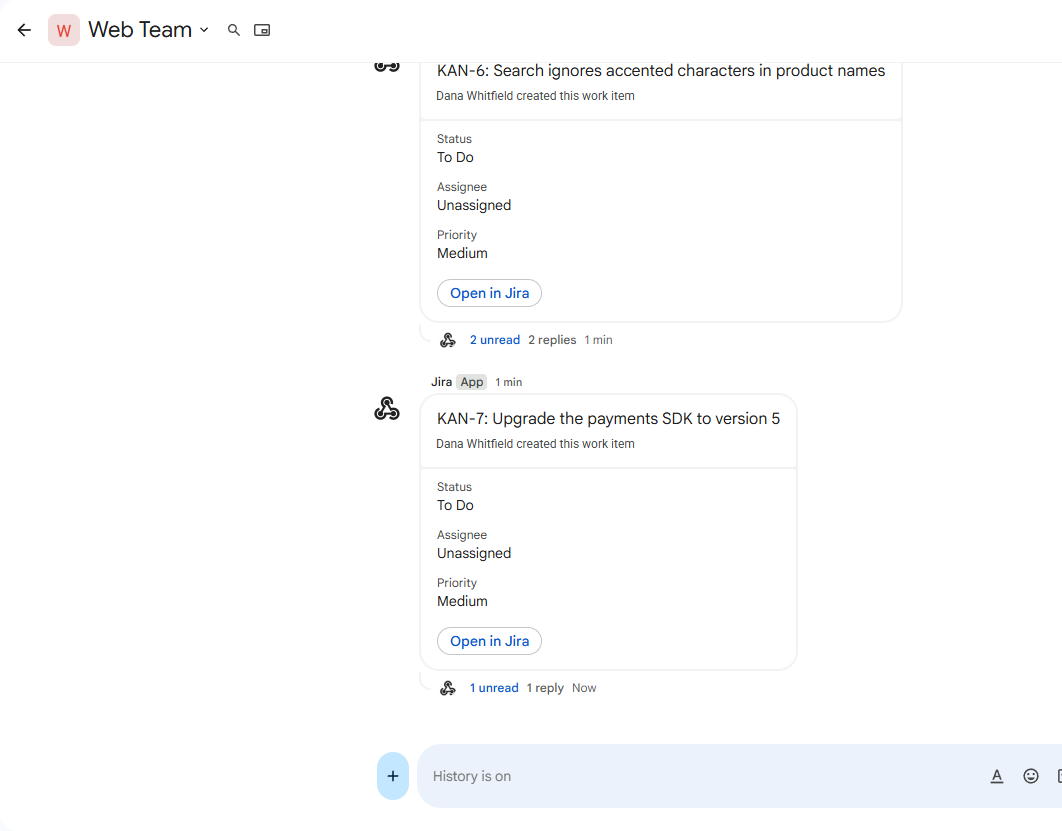
The Google Chat integration Jira was missing
Set up in a minute
Paste a Chat space's webhook, click Save, and a test message arrives. No Google sign-in, no third-party cookies, nothing to break.
Only what matters
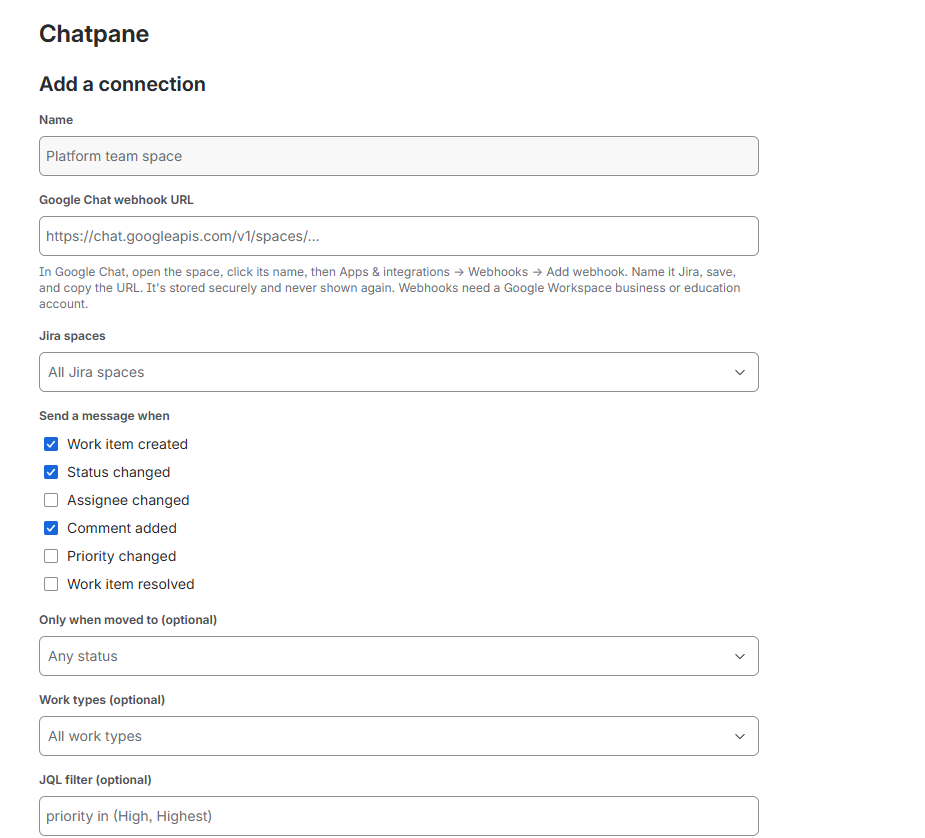
Choose the Jira spaces, events and work types for each Chat space. Send status changes only when work reaches Done, or narrow further with JQL.
One thread per work item
Every update about a work item lands in the same Chat thread, so the space stays readable and the history stays together.
Cards or one-liners
Cards show the fields you pick and an Open in Jira button. Prefer less? Switch to one compact line per update.
Teams set up their own
Jira admins manage every connection. Jira space admins can connect their own spaces from Space settings, if you allow it.
Never fails silently
A delivery log shows every message sent. If a webhook stops working, Chatpane says so plainly and tells you how to fix it.
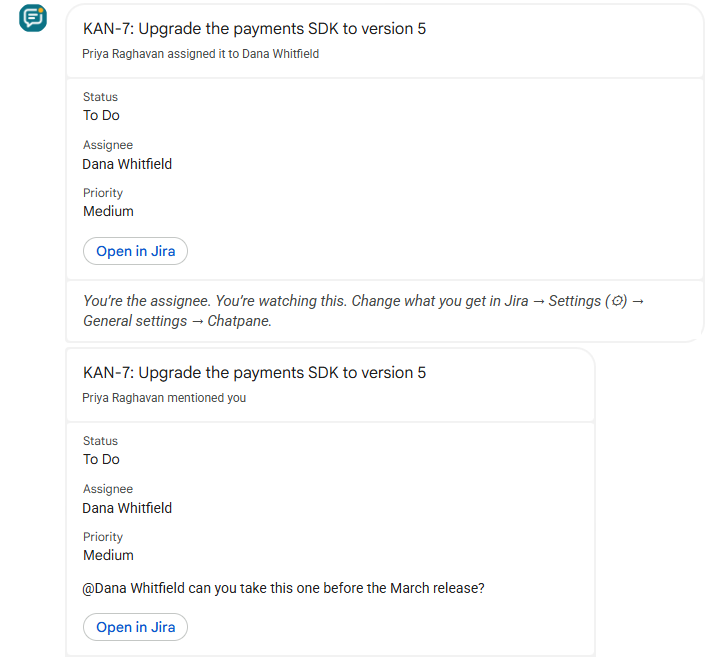
Personal messages about your own work
Once a Jira admin turns personal messages on, each person connects their Google Chat from their Jira settings in a minute and picks what they hear about: work assigned to them, mentions, work they reported or watch. Chatpane never messages people about their own changes, and checks they can open each work item first.
Messages come from the Chatpane app on the Google Workspace Marketplace, which your Google Workspace admin can install for everyone.
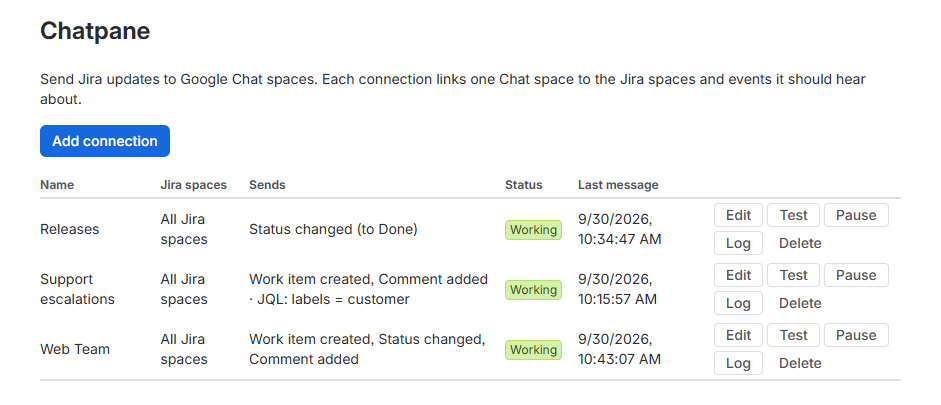
One page for every connection
See which Chat space hears about which Jira spaces and events, whether each connection is working, and when it last sent a message. Test, pause or check the log in one click.
Filters that match how you work
Send only new bugs to the support space, only work that reaches Done to the release space, or only high-priority work to the on-call space. Every connection has its own rules.
Security and privacy
- Runs on Atlassian Forge. Personal messages also use one small Brain Static Threads service, on Cloudflare, that links Google Chat accounts and never sees Jira content.
- Sends Jira updates only to Google Chat, at
chat.googleapis.com: what each connection is set up to send, and personal messages to the people who connected, about work items they can open. - Comment text can be switched off for any connection.
- Webhook URLs are stored securely and never shown again after saving.
- Only Jira admins, and Jira space admins for their own spaces, can manage connections.
- No analytics, advertising or tracking.
Pricing
Up to 10 users
Free
Every feature, for small teams.
| Users on your site | Per user, per month |
|---|---|
| 11–100 | $0.50 |
| 101–250 | $0.35 |
| 251–1,000 | $0.20 |
| 1,001 and up | $0.08 |
Billed through the Atlassian Marketplace. All features are included at every tier.
Questions
What do I need?
Jira Cloud, and Google Workspace (a business or education account). Personal Gmail accounts can't add webhooks to Chat spaces.
Does it need access to our Google account?
Not for Chat spaces: Chatpane posts through each space's incoming webhook, which you create and can delete at any time. Personal messages come from the Chatpane app in Google Chat, which your Google Workspace admin allows or installs. It can only message people who start a chat with it, and it can't read your other chats or spaces.
What gets sent to Google Chat?
The work item key, summary and link, who changed it and how, the fields you choose, and comment text unless you switch it off. Nothing else. See the privacy policy.
Can people get personal notifications?
Soon, once Google approves the Chatpane app for Google Chat. Then a Jira admin turns on personal messages in Jira settings → Apps → Chatpane. Each person then opens Jira Settings (⚙) → General settings → Chatpane, gets a code, and sends it to the Chatpane app in Google Chat. They choose what they get, and can pause or disconnect any time. See the guide.
What happens during a burst of updates?
Google Chat accepts one message per second per space, so Chatpane queues bursts and sends them in order, without losing any.
Does it work with Jira Data Center?
No. Chatpane is built on Atlassian Forge, which is for Jira Cloud.
How do I install it?
From the Atlassian Marketplace: a Jira admin clicks Try it free. Every plan starts with a 30-day free trial, and sites with up to 10 users stay free.
Google Chat and Google Workspace are trademarks of Google LLC. Chatpane isn't made or endorsed by Google.